Departments in Uniconta
This document covers how departments work in both Uniconta and CustomOffice, and how to set them up. It was written alongside the addition of the department dimension as an option on sales lines and project journal lines in Uniconta, so that feature receives particular attention. Setting up tasks and projects is not covered here, as it falls outside the scope of this feature.
How Departments Work in CO and Uniconta
There is currently no automatic sync between CustomOffice and Uniconta for departments, setup must be done manually in both systems.
Uniconta Department Setup
Departments (Afdelinger) can be added as a dimension in Uniconta via:
General Ledger → Maintenance → Dimensions → Dimension setup

The dimension number assigned to departments in Uniconta is important. In the example shown, departments are mapped to Dimension 3, which means the same dimension number must be configured in CustomOffice.

Below is an example of departments registered in Uniconta, along with their associated IDs. These IDs must match exactly in CustomOffice for the integration to work correctly.
Note: There are priority rules on project cost lines that can downgrade the dimension sent to Uniconta. This is expected behavior, but if the expected value is not appearing on a journal line, this is worth checking.
CustomOffice Department Setup
Departments in CustomOffice are managed differently from other resources — they exist as a system-level list under System Settings.

This list must mirror the one in Uniconta, using the same IDs.
To enable departments on tasks, two additional settings control their visibility:
enableExternalTaskDepartmentFieldenableInternalTaskDepartmentField
These toggle whether the department field is shown on external and internal tasks respectively. Other settings exist, but these are the relevant ones for getting departments onto tasks.
New Feature: Departments on Sales Lines and Journal Lines
A new Uniconta-specific setting controls which dimension is used for departments when data is transferred to Uniconta. It is part of a group of settings that map each value to its corresponding dimension on transfer.
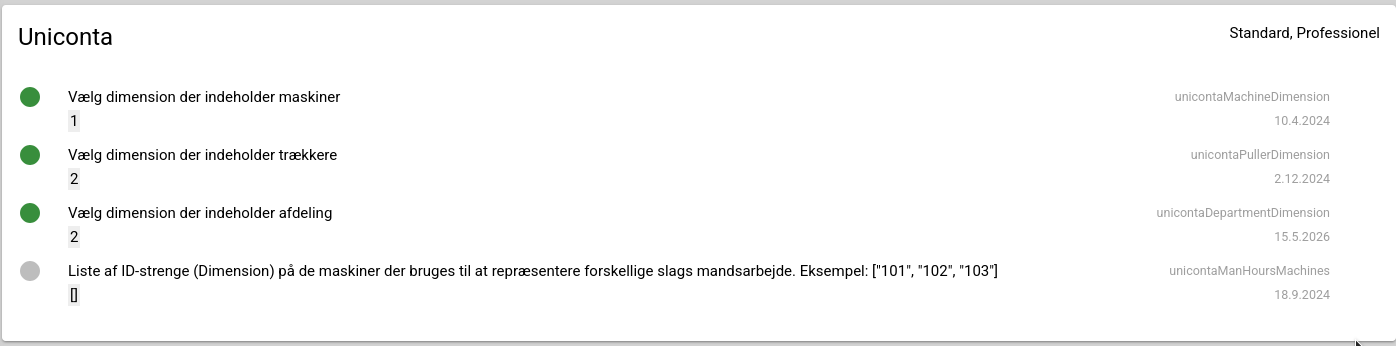
⚠️ There are currently no guards preventing misconfiguration. Choosing the wrong dimension will not be caught until the transfer is rejected by Uniconta.
When configuring this setting, it is critical to select the dimension that matches the one configured in Uniconta.
Testing: Sales Lines
To verify the feature is working for sales lines:
- Create a task with a department assigned to it.
- Transfer the task to Uniconta as normal.
- In Uniconta, navigate to Customer → Sales → Sales Orders.
- Find the account associated with the transferred task and click Order Lines.
- The department column (Afdeling) may not be visible by default. To enable it, go to Layout → Select Fields and add it.

You should now see the department ID populated on the relevant sales lines.
Testing: Project Journal Lines
The process for project journal lines is largely the same, with one difference: the task must be attached to a project.
To verify the transfer:
- In Uniconta, navigate to Project → Journal → Journal.
- Select the journal, likely named customoffice, and click Journal Lines.
- As with sales lines, you may need to adjust the layout to show the relevant dimension column — the procedure is identical.

Quirks and Known Limitations
- No misconfiguration guards — dimensions cannot be shared between values, but the settings do not prevent this.
- No validation on department setup — it is easy to make mistakes in Uniconta without any immediate feedback.
- Wrong dimension causes a silent failure — the transfer will only fail when rejected by Uniconta at transfer time.
What Happens When It Fails
If the department dimension in CustomOffice does not match the one configured in Uniconta, or if there is an ID mismatch between the two systems, the transfer will fail with an error.


This error message is currently not very informative. Improving the error handling and diagnostics around these failure cases would be valuable, but is out of scope for this change.