Testing with Account System
If your feature contains migrations, it would be best to test on localhost and not econ-servers. Because who ever uses econ server for testing, is also responsible for leaving the server in working state after testing is complete. So if you test on public server, then you would need to rollback your migrations.
Testing with e-conomic and econ Servers
Economic CustomOffice Test Servers:
- econ.customoffice.dk
- econ1.customoffice.dk
- econ2.customoffice.dk
Process for testing a feature that uses e-conomic integration.
Testing with e-conomic and Public Servers
Beware if you feature contains migrations
- Announce on Slack channel to reserve an econ server for testing. This is also necessary if you only gonna borrow the integration token from an econ server.
- Follow deploy guide Here. If using an econ server for testing you can skip the next step.
- If not using one of the econ server. Then you need to do step 2 and onwards from guide "Testing with e-conomic on Local Servers"
You need to leave the server in working order afterwards. If it has migrations rollback those. Remove e-conomic integration token from test server when done testing (not relevant on econ servers).
Testing with e-conomic on Local Servers
The step guide below is based on the econ1 server, but it is possible to to this with any of the econ servers.
- Announce on Slack channel to reserve the econ1 server, from which you gonna borrow integration token.
- Clone database from econ1 guide on dump and load.
- Load econ1 dump onto local database.
- Log ind på econ1.co.customoffice.dk go http://econ1.customoffice.dk/#/systemSetup?group=&module=backendConfiguration&q= and copy token.
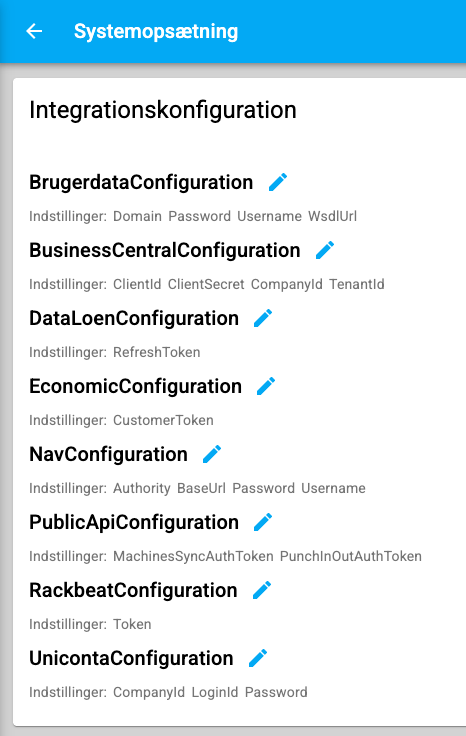
- Paste in token on local instance http://localhost:8080/#/systemSetup?group=&module=backendConfiguration&q=
Remove e-conomic integration token from test server when done testing.